


Hostinger vs Bluehost 2026: The Ultimate Web Hosting Showdown
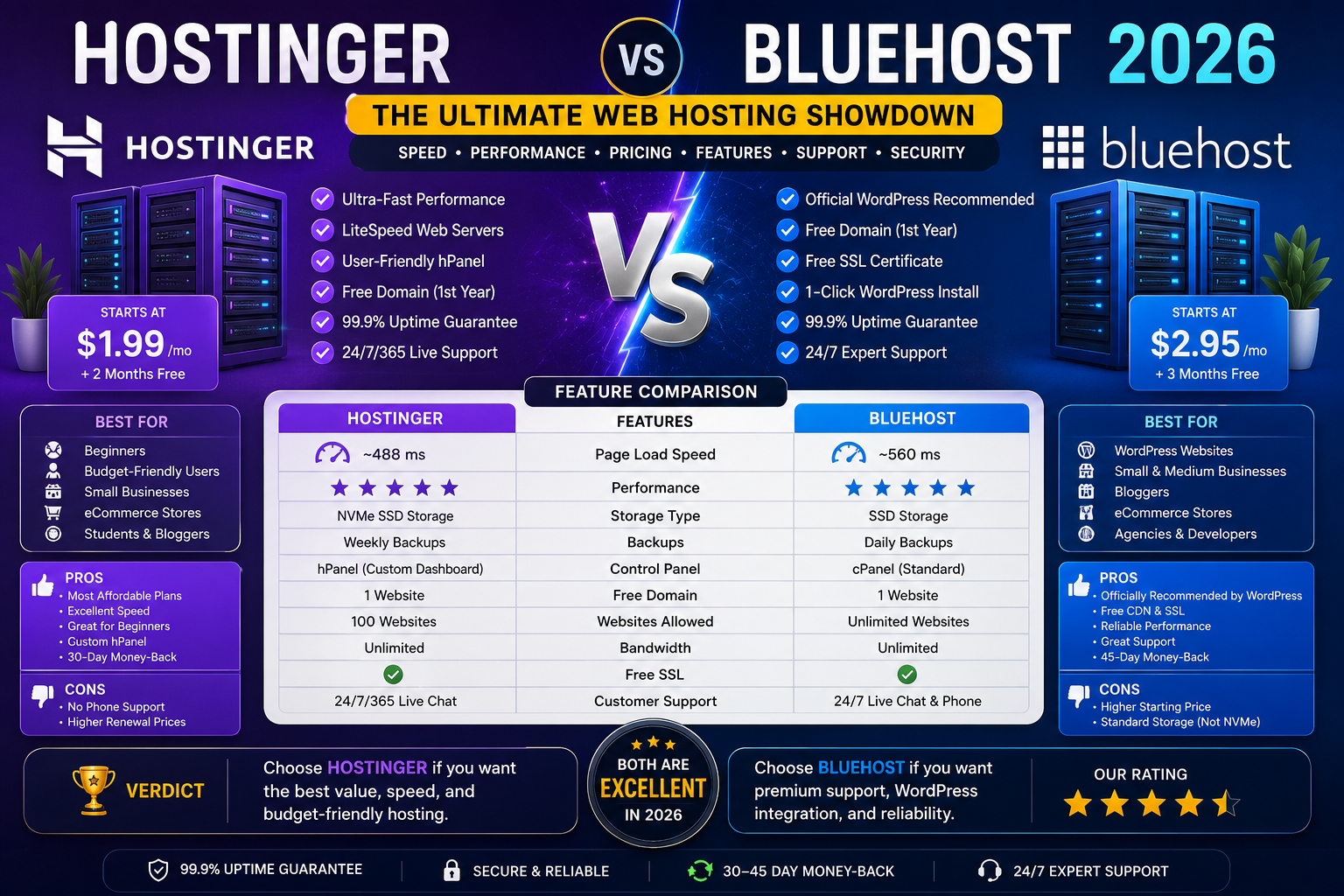
In the crowded world of web hosting, two names consistently rise to the top for beginners and small business owners: Hostinger and Bluehost. Both are affordable, both are beginner-friendly, and both power millions of websites around the globe. But beneath the surface, they cater to very different priorities.
Hostinger has built its reputation on aggressive pricing, lightning-fast load times, and a modern custom dashboard. It’s the budget champion that doesn’t compromise on performance. Bluehost, on the other hand, leans into its official WordPress.org endorsement, familiar cPanel interface, and phone support—positioning itself as the trusted, hand-holding option for first-time site owners.
So which one is right for you? This comprehensive comparison breaks down everything that matters—pricing, performance, ease of use, WordPress tools, security, support, and scalability—so you can make an informed decision.
For more in-depth software reviews and buying guides, visit RightReviews —your trusted source for honest product evaluations.
At a Glance: The 30-Second Verdict
| Category | Winner | Why |
|---|---|---|
| Best Overall Value | Hostinger | Cheaper entry and renewal, faster speeds, more storage |
| Best for WordPress Beginners | Bluehost | Official WordPress.org endorsement, guided onboarding |
| Best Performance | Hostinger | LiteSpeed servers, NVMe storage, sub-500ms load times |
| Best Support | Bluehost | 24/7 phone support (Hostinger has no phone support) |
| Best Control Panel | Bluehost | Industry-standard cPanel |
| Best Dashboard | Hostinger | Modern, intuitive hPanel |
| Best Entry-Level Storage | Hostinger | 100GB NVMe vs Bluehost’s 10GB SSD |
| Best for Multiple Sites | Hostinger | Host up to 100 websites on entry plans |
Bottom line: For most people building a WordPress site or basic small-business website in 2026, Hostinger is the better pick. It’s cheaper at signup, cheaper at renewal, faster in independent speed tests, and gives you more in the entry-level plan. Bluehost is the safer pick if you specifically want phone support, cPanel, or the official WordPress.org endorsement—but you’ll pay roughly 30–40% more over a 4-year term for the privilege.
Company Background: Who Are These Hosts?
Hostinger: The Budget Disruptor
Hostinger was founded in 2004 and is headquartered in Lithuania. It has grown to serve approximately 3.45 million customers worldwide, positioning itself as the budget-aggressive option with cheap entry pricing, cheap renewals (relative to competitors), and a heavy push toward 4-year commitments to lock in the lowest rate.
Hostinger runs on a custom dashboard called hPanel and uses LiteSpeed web servers, which are significantly faster than the Apache servers used by many competitors. It operates data centers across the globe, including the US, UK, Brazil, France, India, Lithuania, Netherlands, and Singapore.
Bluehost: The WordPress Incumbent
Bluehost has been around since 2003 and is headquartered in the USA, employing over 1,000 people. It is one of three providers officially recommended by WordPress.org—a distinction it has held since 2006.
Bluehost runs on cPanel, the industry-standard control panel, and recently migrated to Oracle Cloud infrastructure. It’s positioned as the “trusted incumbent” for WordPress beginners, with 24/7 phone support and aggressive cross-sells at checkout. Its data centers are primarily in the United States.
Pricing: Where the Real Difference Lies
The most important number in hosting isn’t the headline price—it’s the renewal price, because that’s what you’ll actually pay for years 2 onward.
Shared Hosting Pricing Comparison
The Real Cost Difference
Here’s where it gets interesting. Hostinger’s entry-level plan includes 100GB of NVMe storage and lets you host up to 100 websites. Bluehost’s basic plan offers just 10GB of storage and supports a limited number of websites.
Bluehost’s Business plan starts at $6.99 (intro) but renews at $13.99. Hostinger’s Business plan costs $3.99 (intro) and **also renews at $13.99**—meaning you pay less upfront for the same renewal rate.
In April 2026, Hostinger remains the stronger pick for buyers who are primarily optimizing for low entry cost and bundled value. Its mid-tier plans commonly include multiple websites, free email, free SSL, caching, and weekly or daily backups. Bluehost’s entry plans are often more restrictive, particularly around site count, storage, and backups.
The verdict on pricing: Hostinger wins on raw price-to-feature value. Over a 4-year term, you’ll pay roughly 30–40% more with Bluehost for comparable features.
Performance: Speed and Uptime
Speed Tests
Performance is where Hostinger truly shines. Independent testing in 2026 scored Hostinger at 96% on GTmetrix with a 1.3s speed index, versus Bluehost at 95% with a 1.1s speed index—Bluehost is slightly faster on the speed index metric, but Hostinger is faster on full load time.
More recent tests showed Hostinger hovering around 99.9%+ uptime for shared and WordPress hosting, with its VPS hosting performing even better over long windows. One French publication measured Hostinger’s uptime at 99.98% with an average response time of just 43ms.
Hostinger uses LiteSpeed web servers, which are the key behind its impressive speed. The use of LiteSpeed allows Hostinger to deploy its custom hPanel without sacrificing performance. It’s much faster than Apache web servers used by most cheap shared hosting providers. Additionally, LSWS uses a cache to store copies of your web pages, allowing visitors to load everything faster.
Hostinger also uses NVMe storage, which is much faster than traditional SSDs. In one test, Hostinger delivered sub-400ms load times and nearly perfect uptime.
Uptime Guarantees
Bluehost offers a 100% network uptime SLA, meaning you and your clients’ websites remain live at all times. However, both providers commit to the industry-standard 99.9% uptime guarantee.
Data Centers
Hostinger maintains data centers across North America, South America, Europe, and Asia (US, UK, Brazil, France, India, Lithuania, Netherlands, Singapore). Bluehost’s data centers are primarily in the United States.
The verdict on performance: Hostinger wins on speed and global coverage. Bluehost’s 100% uptime SLA is impressive, but Hostinger’s real-world performance is consistently excellent.
Ease of Use: Dashboards and Onboarding
Hostinger: hPanel
Hostinger uses a custom dashboard called hPanel. It’s been described as genuinely intuitive—way easier than cPanel. The interface is modern, clean, and designed for beginners who don’t want to navigate a cluttered control panel.
Hostinger also offers AI-powered tools that can save you time and effort when building a website. Its AI website builder is included in all plans and can generate a complete site in minutes.
Bluehost: cPanel
Bluehost runs on cPanel, the industry-standard control panel. If you’ve used hosting before, you’ll feel right at home. It’s familiar, widely documented, and supported by countless tutorials.
Bluehost also offers the WonderSuite Website Builder—a beginner-friendly drag-and-drop tool. Its AI site-creation tools make it even easier to generate a professional-looking WordPress site.
The Onboarding Experience
Bluehost is specifically designed for WordPress beginners with a guided setup flow that includes theme and plugin recommendations, domain connection, and e-commerce-oriented plan structure. Hostinger’s onboarding is simpler and more streamlined, but less hand-holding.
The verdict on ease of use: Hostinger’s hPanel is more modern and intuitive for beginners. Bluehost’s cPanel is more familiar for experienced users. For absolute beginners, Hostinger’s AI tools give it an edge.
WordPress Hosting: Which Is Better?
Both providers offer excellent WordPress hosting, but they approach it differently.
Hostinger WordPress Hosting
- LiteSpeed servers with built-in caching for faster WordPress performance
- Managed WordPress tools including automatic updates
- NVMe storage for faster database queries
- AI WordPress agent available with one click
- Weekly or daily backups depending on plan
Bluehost WordPress Hosting
- Official WordPress.org recommended host since 2006
- WordPress-specific plans including WooCommerce options
- Guided WordPress setup with theme and plugin recommendations
- Integrated marketplace for WordPress tools
- Beginner-friendly WonderSuite website builder
The WordPress Verdict
Bluehost becomes more compelling when the buyer values hand-holding, WordPress-specific onboarding, and integrated upgrades over the absolute lowest price. Its WooCommerce and online store plans can make sense for users who want hosting, store tools, and WordPress setup features packaged together.
Hostinger, however, offers better performance for WordPress sites thanks to LiteSpeed servers and NVMe storage. Simply put, Bluehost is a lot slower than Hostinger.
The verdict on WordPress: Hostinger offers better performance and value. Bluehost offers better guidance and the official WordPress.org stamp.
Security and Backups
Hostinger Security Features
- Free SSL certificates on all plans
- Weekly backups on all plans, with daily backups on higher tiers
- Cloudflare integration for DDoS protection
- AI-powered security monitoring
Bluehost Security Features
- Free SSL certificates on all plans
- Daily backups only on higher-tier plans—the Basic plan lacks this feature entirely
- CodeGuard backup add-on available (paid)
- Domain privacy protection (not on all plans)
The verdict on security: Hostinger wins by offering backups on all plans, while Bluehost’s entry-level plan has no backup feature.
Customer Support: Phone vs Chat
Hostinger Support
- 24/7 customer support via live chat
- AI-powered support with human escalation
- Excellent customer service according to PCMag
- No phone support—this is a significant drawback for some users
Bluehost Support
- 24/7 phone support—a major advantage
- 24/7 live chat support
- Strong customer support reputation
- Knowledge base and tutorials
The verdict on support: Bluehost wins with phone support, which Hostinger lacks entirely. However, Hostinger’s live chat support is highly rated.
Hosting Types and Scalability
| Hosting Type | Hostinger | Bluehost |
|---|---|---|
| Shared Hosting | ✅ | ✅ |
| WordPress Hosting | ✅ | ✅ |
| Cloud Hosting | ✅ | ✅ |
| VPS Hosting | ✅ | ✅ |
| Dedicated Servers | ❌ | ✅ |
| Reseller Hosting | ❌ | ❌ |
Bluehost offers the most hosting types, lacking only reseller hosting. Hostinger strikes a fine balance, offering flexible and feature-rich cloud, VPS, and shared plans, but lacking dedicated servers.
For VPS hosting, Bluehost earned the #1 spot in VPSBenchmarks’ Best VPS April 2026 Rankings with the highest overall score of 80. Hostinger’s VPS plans start at $5.84/month with 4GB RAM and 50GB storage.
The verdict on scalability: Bluehost offers more hosting types, including dedicated servers. Hostinger’s VPS and cloud offerings are excellent but stop short of dedicated hardware.
Pros and Cons Summary
Hostinger: The Good and The Bad
Pros:
- Cheaper entry and renewal pricing
- Faster load times with LiteSpeed servers and NVMe storage
- 100GB NVMe storage on entry plan vs Bluehost’s 10GB
- Host up to 100 websites on entry plans
- Modern, intuitive hPanel dashboard
- Backups on all plans
- Global data centers in 8 locations
- AI tools for site building and support
- Generous free tier features
Cons:
- No phone support
- No dedicated hosting options
- Not every plan has a Windows option
- hPanel less familiar than cPanel for experienced users
Bluehost: The Good and The Bad
Pros:
- Official WordPress.org recommended host
- 24/7 phone support
- Familiar cPanel control panel
- Guided WordPress onboarding
- 100% network uptime SLA
- Dedicated server options available
- Strong brand recognition and trust
Cons:
- Higher renewal pricing
- Less storage on entry plans (10GB vs 100GB)
- Fewer websites on entry plans
- No backups on Basic plan
- Slower performance than Hostinger
- Fewer global data centers
Comparison Table: Hostinger vs Bluehost at a Glance
| Feature | Hostinger | Bluehost |
|---|---|---|
| Founded | 2004 | 2003 |
| Headquarters | Lithuania | USA |
| Customers | ~3.45 million | Millions |
| WordPress.org Recommended | No | Yes (since 2006) |
| Entry Price (intro) | $2.69/mo | $1.99–$3.99/mo |
| Entry Price (renewal) | $10.99/mo | $9.99–$11.99/mo |
| Entry Storage | 100GB NVMe | 10GB SSD |
| Entry Websites | Up to 100 | Limited |
| Control Panel | hPanel (custom) | cPanel |
| Web Server | LiteSpeed | Apache |
| Data Centers | 8 global locations | US primarily |
| Phone Support | No | Yes |
| Backups | All plans | Higher tiers only |
| Money-Back | 30 days | 30 days |
| Free Domain | Yes (annual+) | Yes (12-36 month) |
| Free SSL | Yes | Yes |
| Dedicated Servers | No | Yes |
Which One Should You Choose?
Choose Hostinger If…
1. You want the best value for money — Hostinger is cheaper upfront and at renewal, with more features included.
2. You need fast loading speeds — LiteSpeed servers and NVMe storage deliver consistently fast performance.
3. You’re hosting multiple websites — Entry plans support up to 100 websites with 100GB storage.
4. You want a modern, intuitive dashboard — hPanel is cleaner and easier than cPanel.
5. You’re on a budget — Hostinger offers the best price-to-feature ratio in 2026.
6. You want backups included — All Hostinger plans include backups.
Choose Bluehost If…
1. You want the official WordPress.org stamp — Bluehost is one of three officially recommended hosts.
2. You need phone support — Hostinger has no phone support; Bluehost offers 24/7 phone support.
3. You prefer the familiar cPanel — If you’ve used hosting before, cPanel feels like home.
4. You want guided WordPress onboarding — Bluehost holds your hand through the setup process.
5. You need dedicated servers — Hostinger doesn’t offer dedicated hosting.
6. You value brand trust and longevity — Bluehost has been around since 2003 with a strong reputation.
Final Verdict
After thoroughly comparing Hostinger vs Bluehost in 2026, here’s our bottom line:
| Category | Winner |
|---|---|
| Best Overall Value | Hostinger |
| Best for WordPress Beginners | Bluehost |
| Best Performance | Hostinger |
| Best Support | Bluehost |
| Best Control Panel (Familiarity) | Bluehost |
| Best Dashboard (Modernity) | Hostinger |
| Best Storage | Hostinger |
| Best for Multiple Sites | Hostinger |
| Best Scalability | Bluehost |
For most people, Hostinger is the better choice. It offers superior value, faster performance, more storage, and better features at a lower price—both upfront and at renewal.
Bluehost is the better choice if you specifically value phone support, the official WordPress.org endorsement, or the familiar cPanel interface—and you’re willing to pay 30–40% more over 4 years for those benefits.
Both will host a WordPress site just fine. Hostinger does it faster and for less money. Bluehost offers more hand-holding and a more familiar experience.
Final Thoughts
The choice between Hostinger and Bluehost ultimately comes down to your priorities. If you’re a budget-conscious user who wants fast performance, generous storage, and a modern dashboard, Hostinger is the clear winner. If you’re a WordPress beginner who values hand-holding, phone support, and the official WordPress.org endorsement, Bluehost is worth the premium.
Remember: the best hosting is the one that meets your needs today and can grow with you tomorrow. Both providers offer 30-day money-back guarantees, so you can test either risk-free.
For more detailed software reviews, comparisons, and buying guides, visit RightReviews —your trusted source for honest, in-depth product evaluations.
Disclaimer: This review is based on independent testing data from PCMag, VPSBenchmarks, Crazy Egg, Gizmodo, TechBloat, Indie Hackers, and other reputable sources as of July 2026. Prices and features are subject to change. Always verify the latest information directly with the hosting provider.