

Canva vs Adobe Express 2026: The Ultimate Design Tool Showdown
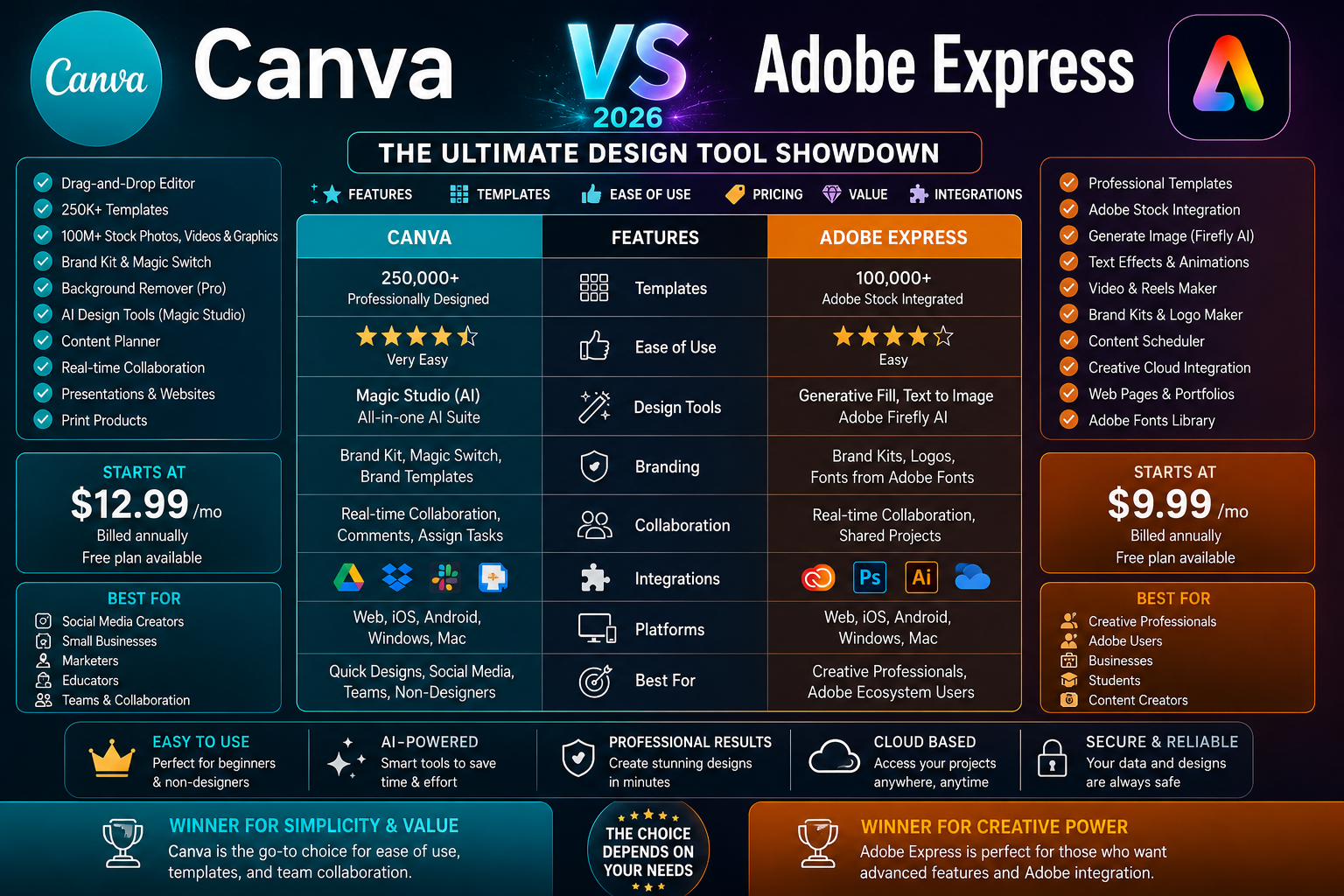
In the world of online design, two names dominate the conversation: Canva and Adobe Express. Both promise to make professional-quality design accessible to everyone—no design degree required. Both offer powerful free tiers and compelling paid upgrades. And both have evolved dramatically in 2026, with AI capabilities that would have seemed like science fiction just a few years ago.
But beneath the surface, these two platforms take fundamentally different approaches to the same problem. Canva is the versatile, template-rich all-rounder—the platform that has become synonymous with democratized design. Adobe Express is the polished, ecosystem-native alternative—leaner, more focused, and built for users who need professional polish without leaving the Adobe universe.
This comprehensive comparison breaks down everything that matters—features, AI capabilities, pricing, ease of use, templates, collaboration, and real-world performance—so you can decide which design tool is right for you.
For more in-depth software reviews and buying guides, visit RightReviews —your trusted source for honest product evaluations.
At a Glance: The 30-Second Verdict
Bottom line: For most people creating everyday content—social media graphics, presentations, marketing materials—Canva is the better choice in 2026. It’s broader, more versatile, and easier to recommend. Adobe Express is the better choice if you’re already in the Adobe ecosystem, need commercially safe AI-generated assets, or value polish and professional precision over raw template volume.
What Are Canva and Adobe Express?
Canva: The Design Platform That Changed Everything
Canva launched in 2013 and has since grown into the world’s most popular online design platform. Used by over 100 million people monthly, it has fundamentally democratized graphic design—making it possible for anyone to create professional-looking visuals without any design training.
Canva is a cloud-based design platform that enables teams to create visual content—from social media graphics and presentations to marketing materials and brand assets—without requiring professional design skills. Originally positioned as a consumer tool, Canva has expanded into the enterprise market with Canva for Teams and Canva Enterprise, offering brand controls, collaboration features, and integrations that appeal to marketing, creative, and communications teams.
Canva’s philosophy is versatility above all else. It wants to be the one-stop shop for all your visual content needs, from Instagram posts to full-blown websites.
Adobe Express: The Professional’s Quick-Design Tool
Adobe Express (formerly Adobe Spark) is Adobe’s direct answer to Canva. It was launched as Adobe Spark and rebranded twice before finding its current form. For several years, it lagged behind Canva on template volume, UI refinement, and ease of use. That gap has now closed.
Adobe Express is an all-in-one design, photo, and video solution that helps businesses streamline content creation. It enables users to create social media posts, videos, logos, and other visuals using AI-powered tools like an AI Assistant for editing.
But what truly sets Adobe Express apart is its ecosystem depth. Adobe has built something Canva structurally cannot replicate: a native bridge between quick design and professional production. When designers use Adobe Express, they’re working inside the same ecosystem as Photoshop and Illustrator—making it seamless to move work between quick-turnaround assets and serious production.
Feature Comparison: Head-to-Head
Templates and Design Assets
Verdict: Canva wins on raw template volume and breadth. Adobe Express wins on stock photo quality and commercial-grade assets thanks to its Adobe Stock integration.
AI Capabilities
This is where the 2026 battle gets interesting. Both platforms have invested heavily in AI, but they’ve taken different approaches.
Canva’s AI approach:
- Canva AI 1.0 (free tier): Magic Write, Background Remover with limited monthly usage
- Canva AI 2.0 (paid tiers): Full access to advanced AI features
- Magic Studio: Comprehensive AI toolset including text-to-image, text-to-video, and design suggestions
- Third-party AI integrations: Canva uses a mix of proprietary and third-party AI models
Adobe Express’s AI approach:
- Adobe Firefly: Adobe’s proprietary generative AI model
- Commercially safe: Firefly is trained exclusively on licensed and public-domain content, which means generated assets are cleared for commercial use
- 250 generative credits per user, per month on Premium plan
- Deep integration: Firefly is “baked in” to Adobe Express
AI Verdict: Adobe Express wins for commercial safety and professional-grade AI. The fact that Firefly is trained on licensed content means you can use AI-generated assets in client work without legal worry. Canva offers more AI tools overall but with less flexibility—its text-to-video feature is more accessible for beginners, though outputs can be inconsistent.
Collaboration Tools
Verdict: Canva wins. Its collaboration tools are mature and well-designed, having been refined over years of use by millions of teams. Adobe Express’s collaboration features are solid but haven’t reached Canva’s level of polish.
Editing and Design Tools
Verdict: Canva offers broader editing capabilities overall. Adobe Express focuses on core design tools done well, but Canva’s feature set is more extensive.
Pricing: The Numbers Game
Canva Pricing (2026)
Adobe Express Pricing (2026)
The Real Cost Difference
Adobe Express is cheaper at the main paid tier: Premium starts at $9.99/month, compared with Canva Pro at around $15/month.
Adobe Express also gives away more on the free plan, including features like scheduling and version history that Canva places behind its paid subscription.
However, Canva’s free tier is more generous with resources, offering access to a broader range of templates and design elements before you need to pay.
For teams, Canva Teams starts at $29.99/user/month, while Adobe Express offers volume pricing for teams.
Verdict on pricing: Adobe Express wins on paid tier value—you get more for less money. Canva wins on free tier generosity—you can do more before needing to upgrade.
Ease of Use: Which Is More Beginner-Friendly?
Canva: The Gold Standard for Accessibility
Canva is the gold standard for ease of use. It scores 4.7/5 in this category in user reviews. Its drag-and-drop interface is intuitive, its template library makes starting from scratch unnecessary, and its learning curve is practically nonexistent.
ZDNET describes Canva as broader, faster, and easier to recommend for most people. It’s the platform that has made design accessible to millions of non-designers.
Adobe Express: Cleaner but With a Professional Edge
Adobe Express scores 4.5/5 for ease of use—still excellent, but slightly behind Canva. It’s described as a cleaner tool than Canva, but that cleanliness comes with a slightly more professional orientation.
For complete beginners, Canva remains the Editors’ Choice winner because it’s even easier to use.
Verdict on ease of use: Canva wins for absolute beginners. Adobe Express is still beginner-friendly but has a slightly more professional orientation that may appeal to users with some design experience.
Professional Use: Where Adobe Express Shines
The “Switching Back” Phenomenon
In 2026, something interesting is happening in professional design studios. Designers who once flocked to Canva for its speed and simplicity are reconsidering. They’re not abandoning quick design workflows—instead, they’re recognizing that Adobe Express has become a fundamentally different product, one that speaks their language and fits their actual creative stack.
Why Professionals Are Choosing Adobe Express
1. Ecosystem Integration
Most designers who “switched” to Canva between 2019 and 2023 never fully left Adobe. They used Canva for quick-turnaround assets while keeping Photoshop and Illustrator open in separate windows. Adobe Express now offers a native bridge between quick design and professional production.
2. Commercial-Grade AI
Adobe Firefly’s training on licensed content means AI-generated assets are cleared for commercial use. For professionals creating work for clients, this is a critical advantage.
3. Professional-Grade Output
Adobe Express templates are suitable for all levels of designer and can be designed for professional use. On all three dimensions—design quality, ecosystem depth, and AI quality—Adobe Express scores significantly higher than Canva for designers already inside Creative Cloud.
4. Adobe’s Investment
Adobe Express recorded a 96% quarter-over-quarter increase in monthly active mobile users, alongside an 86% year-over-year surge in cumulative creations. Those are not the numbers of a product coasting on brand legacy—Adobe is investing heavily.
Verdict for professionals: Adobe Express is the better choice for professional designers and Adobe users. Canva remains the better choice for everyday content creation.
Real-World Use Cases
When to Choose Canva
1. Social Media Management
Canva’s massive template library makes creating social media graphics for every platform quick and easy. With Canva Pro, you can schedule posts directly from the platform.
2. Presentations
Canva’s presentation tools are robust and beginner-friendly, with thousands of presentation templates.
3. Small Business Marketing
If you’re a small business owner creating your own marketing materials, Canva’s breadth of templates and ease of use make it the obvious choice.
4. Education
Canva’s free plan for educators and students is generous, making it the go-to for schools.
5. Teams and Collaboration
Canva’s collaboration tools are mature and well-designed, making it ideal for teams that need to work together on designs.
6. Non-Designers
If you have no design experience and just want to create professional-looking visuals quickly, Canva is the better choice.
When to Choose Adobe Express
1. Adobe Creative Cloud Users
If you already use Photoshop, Illustrator, or other Adobe tools, Adobe Express is a natural extension of your workflow.
2. Professional Designers
For designers who need professional-grade output and commercial-safe AI, Adobe Express offers advantages Canva can’t match.
3. Commercial AI Generation
If you need to generate AI images for client work, Adobe Firefly’s commercial safety is a critical advantage.
4. Brand Consistency
Adobe Express’s deep integration with Adobe Fonts and Adobe Stock makes it excellent for maintaining brand consistency.
5. Quick Professional Projects
For quick-turnaround assets that need professional polish, Adobe Express is the cleaner, more polished tool.
6. Budget-Conscious Paid Users
At $9.99/month for Premium, Adobe Express offers more features for less money than Canva Pro.
Pros and Cons Summary
Canva: The Good and The Bad
Pros:
- Massive template library—1M+ templates across hundreds of categories
- More beginner-friendly—easier to learn and use
- Broader feature set—more tools for more types of projects
- Mature collaboration tools—well-designed for teams
- Generous free tier—more resources before you need to pay
- Versatile—handles everything from social graphics to presentations to basic websites
Cons:
- More expensive paid tier—Pro costs ~$15/month vs Adobe Express Premium at $9.99/month
- AI not commercially safe—uses third-party models without the same licensing guarantees
- Less professional polish—output can sometimes feel template-driven
- Less precision—lacks the fine control of professional tools
Adobe Express: The Good and The Bad
Pros:
- Cheaper premium tier—$9.99/month vs Canva Pro’s ~$15/month
- Commercially safe AI—Firefly trained on licensed content
- Native Adobe integration—seamless workflow with Creative Cloud
- More polished output—cleaner, more professional designs
- More generous free features—includes scheduling and version history
- Professional-grade assets—200M+ Adobe Stock assets
Cons:
- Smaller template library—100,000+ vs Canva’s 1M+
- Less beginner-friendly—slightly steeper learning curve
- Narrower feature set—fewer tools for different types of projects
- Less versatile—more focused on core design tasks
- Newer to the market—less mature collaboration tools than Canva
Comparison Table: Canva vs Adobe Express at a Glance
Final Verdict
After thoroughly comparing Canva vs Adobe Express in 2026, here’s our bottom line:
| Category | Winner |
|---|---|
| Best Overall for Most Users | Canva |
| Best for Professionals | Adobe Express |
| Best Value Paid Plan | Adobe Express |
| Best Free Plan | Canva |
| Best Templates | Canva |
| Best AI | Adobe Express |
| Best Collaboration | Canva |
| Best Ease of Use | Canva |
| Best for Adobe Users | Adobe Express |
| Best for Commercial Work | Adobe Express |
For most people, Canva is the better choice in 2026. It’s broader, more versatile, and easier to recommend. Its massive template library, mature collaboration tools, and beginner-friendly interface make it the go-to platform for everyday content creation.
Adobe Express is the better choice if you’re a professional designer or already in the Adobe ecosystem. Its commercially safe AI, native Creative Cloud integration, and polished output give it advantages that matter for professional work. Plus, at $9.99/month for Premium, it offers better value than Canva Pro.
The good news? Both offer free tiers. Before committing to a paid plan, try both on your own projects and see which one fits your workflow better.
Final Thoughts
The choice between Canva and Adobe Express ultimately comes down to your priorities and your workflow.
If you value versatility, template breadth, and beginner-friendliness, Canva is the clear winner. It’s the platform that has democratized design for millions of people, and it continues to lead in 2026.
If you value professional polish, commercially safe AI, and native integration with Adobe’s ecosystem, Adobe Express is worth the switch. It’s no longer playing catch-up—it has become a fundamentally different product that speaks the language of professional designers.
Both platforms are excellent. Both are getting better every month. And both offer enough in their free tiers that you can test them thoroughly before spending a dime.
For more detailed software reviews, comparisons, and buying guides, visit RightReviews —your trusted source for honest, in-depth product evaluations.
Disclaimer: This review is based on independent testing data from ZDNET, Software Advice, We and the Color, and other reputable sources as of July 2026. Prices, features, and template counts are subject to change. Always verify the latest information directly with the provider.